Foreword: Hopefully this provides other candidates, both accidental and intentional, some insight into Google’s interview process after their reported interview changes have gone into effect. My goal is NOT to show saltiness for a company that has given me so many good search results over the years.
Part 0
“Surprise”
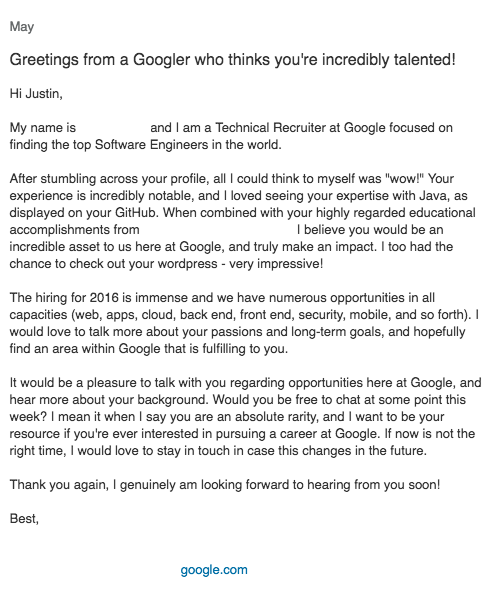
In spring of 2016, a Google recruiter reached out to me via LinkedIn and asked if I was interested in applying. The message gave me pause for a couple of reasons, but the first was because of the actual content:
Of course I was blown away. Google thinks I’m an asset?! So I kept reading and eventually got to the part about my Github, notable experience, and being a rarity. I need to take a detour here for reasons that will hopefully become obvious. If you have looked at my Github, you’ll see that there isn’t anything really spectacular on it. I haven’t contributed to any open source projects. I don’t have proof of concepts for a new algorithm solving the Traveling Salesman problem. So, what did the recruiter think was so incredibly notable? It doesn’t matter and that’s the point. Their job was to get my attention, and they did that.
The recruiter and I corresponded for a while before we scheduled a phone call to check that I wasn't a robot. We eventually spoke on the phone for an hour about what I did at my current position and what sort of technologies I was interested in working on. They were very polite, very genuine, and seemed very interested in getting me to the next stage. I explained that I had reservations about applying for Google since they have turned away markedly impressive people. They assured me that their processes have changed and are more down to earth now (Google no longer asks the brain teaser questions they were known for). The recruiter seemed to like me enough to let me know that if I wanted to continue with the process they would get me scheduled for a technical phone screen. “Why not” is sort of my motto, so I asked them to schedule me for a phone screen with a tech.
Part 1
“Preparation”
My very awesome recruiter sent me a couple emails on how to prepare for the technical phone screen. The email included video links and recommendations for subjects to look at before the call. I had about one week for preparation, not to mention needing to fulfill my full-time engineering responsibilities at work and preparing for a conference the following week.
*Note: Your Google recruiter will tell you that you can have as much time as you want to prepare. It’s the only company I’ve ever known to willing give you months (I was offered two months) to prepare from the time of application, to the time of the phone screen. This is either incredible or confusing. Why do I need months to prepare…for a phone screen(not even an interview)?
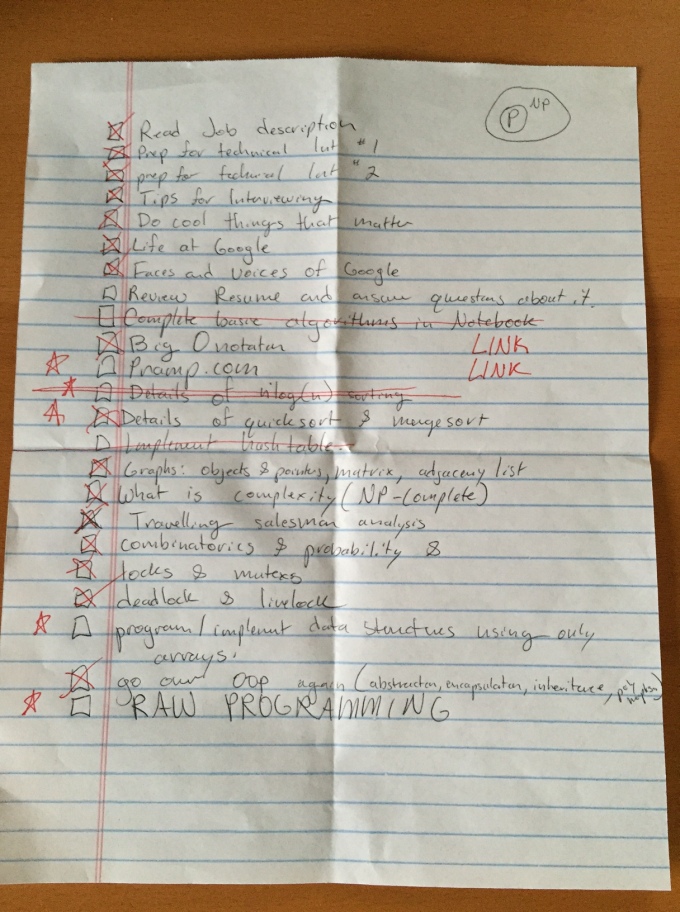
Here is my short-list of things I wanted to refresh on that I picked out of the email:
Most of the things on my list I felt made excellent topics to look over since I hadn’t seen all of them in the wild after graduating. For this round, I didn’t use any additional guides or resources beyond what I could find online.
*Note: Everyone, all the Google videos you watch, and all the resources you read will tell you to constantly “Say what you are thinking.” This is misleading. What they should be telling you is, “Say or present the answer to the problem you are given immediately, and then give a sentence or two that supports how you know the solution or algorithm is such.”
Part 2
“First Call”
A week later I had a call with a very nice gentleman who worked in the Youtube Advertising department. He didn’t ask me anything about myself and started promptly with the technical questions. In order to comply with not disclosing the questions I was directly asked, I will provide general examples of what he focused on. The first part of the interview focused on core questions involving my knowledge of data structures. No coding necessary for this part. The second part involved writing a single function to perform string manipulation. This part was fairly straightforward and I was able to produce a solution with ten minutes left. However, through out the coding exercise the gentleman would sporadically insert his cursor in the middle of a code snippet I was actively working on and make changes regardless of what I was doing. I won’t say this was a bad thing, but it was definitely jarring. It was similar to a peer programming session, but if the other person you were coding with had a keyboard and mouse active to the exact machine you were using, trying to code at the same time. Finally, the last portion of the interview involved him asking me to analyze the complexity of the function that I had written. Here is where I screw myself over.
I went through line by line explaining how the for loop was going to at least be O(n) and each assignment had a constant time of O(1). They don’t want you to do this! I thought I would build my case for O(n) before arriving at the conclusion of the big O time complexity being O(n) for the overall function I wrote. What they want you to do is state, “The function's complexity is O(n), and I immediately know that because of <insert supporting arguments>.” This mistake interpreting the, “Say everything you are thinking” cost me the phone screen.
The next day, my super awesome recruiter called to say that the tech’s feedback was borderline. They told me that my interviewer thought my skills and knowledge were excellent, but that my speed at analyzing the complexity was far too slow. Color me surprised. I explained to the recruiter how I made sure to explain and vocalize everything I was thinking and that if I realized he was looking for a prompt answer without support, I could have given it to him. They asked if I felt like trying again and I said sure.
*Note: Any information, aside from feedback from your tech, does not get passed between the different components of the process you will interact with. Information communicated to your interviewer, recruiter, or other HR proxy has no guarantee of making it to other appropriate parties. Do not make the assumption that your recruiter communicated anything about you to your actual tech screener.
**Note: Being awesome to your recruiter means they are going to be awesome for you. Without such an amazing recruiter, I likely wouldn’t have gotten a second chance, but because of them, I did. These people are your ticket.
Part 3
“More Preparation”
At this point, I felt pretty good about my abilities, but just needed to curb how I talked to the phone screener. My awesome recruiter told me I should go purchase a book called “Cracking the Coding Interview.” I didn’t immediately think I needed it since I did well on my first round, but I decided to get it to prepare myself on things I hadn’t thought of yet. The book was extremely helpful in understanding how each of the big five tech companies hire people and the kinds of things they are looking for. I spent about one and one half weeks with the text working the various problem sets. In total, it was probably an additional twenty hours preparing for the second phone screen. Eventually it was the day before the phone call and I felt prepared enough and ready to repeat my performance with a greater emphasis on quickly asserting any answers.
Part 4
“Trees”
I sat anxiously at my computer with my headphones in waiting for the second tech screener to call. At two minutes past the hour, I received a phone call from my second screener. We exchanged pleasantries which was a welcomed change from the first screen and then he asked me about what I did in my current position as well as about a personal project I had worked on. I spent four minutes explaining these things to him before he said, “Okay, I didn’t think that would take so long.” I found it rude to say the least since he asked me questions and then backhandedly scolded me for it.
The screen wasn’t off to a great start. Again, I was asked not to disclose the exact questions I was asked, but I can give you some idea about the content. This screener asked me to code up a couple classes and a function that could find a specific type of path for a tree with any given structure; binary or not. I realize this is incredibly vague, so in solidarity with you the reader, think about what Dijkstra’s algorithm does. My preparation mattered not as I tried to propose a solution that would work for an even reduced version of the problem(In fairness, I had not done a significant amount of preparation on trees yet). He was kind enough to inform me at each step that my solution wasn’t doing what I thought it was and that I should try a recursive algorithm. With only a few minutes left I informed him that there was no way I could conceivably reverse my state and that I would appreciate if he gave me my inevitable feedback upfront instead of waiting for my recruiter to call and tell me the same. He told me he could not legally do that, so I asked him to allude to it. He told me, “Lots of engineers have to apply more than once. I myself has to apply twice.” I thanked him for his time and we hung up.
Part 5
“Aftermath”
Afterwards, I wrote my super awesome recruiter an email and told them that I knew I had bombed the second phone screen and that I appreciated all their hard work over the last month. They wrote me back to give me the official legal response that is, “With this, we will not be going forward with the process.” We both decided to keep in contact in the event that I was interested in applying in the future.
Good luck!
* Additional Notes: (Contains Personal Opinion)At the end of a call, when recruiters, techs, screeners and the like ask if I have any questions, the first thing I always ask is, "What do you enjoy most about your job?" It's a fairly open-ended question and allows me to get a feel for what I might like about the job if I worked for that particular organization. I asked my recruiter what they liked most about their job and I believe they said something along the lines of, "The people are so great." I asked the same thing to my first tech screener and he said verbatim, "Everyone knows who Google is. Why wouldn't you want to work here?" This answer wasn't what I was looking for, so I pressed him a little more. "The benefits are incredible." I understand that we all have different motivations for the choices we make, but having a well known name and good benefits doesn't really convince me that your org is a good place to work. I am already familiar with the fact that not everyone has a passion for this stuff, and for many it is just a job with excellent pay, but I was very surprised that the best thing my tech screener could identify about his work life was that it had incredible benefits. Unless you are currently destitute, we forget that an interview process is two sided. They need to convince you to work for them, just as much as you need to convince them that you could.
Canary: At this time, no organization, private, government, or otherwise, has prompted/coerced me to edit or remove the content provided in this blog entry.